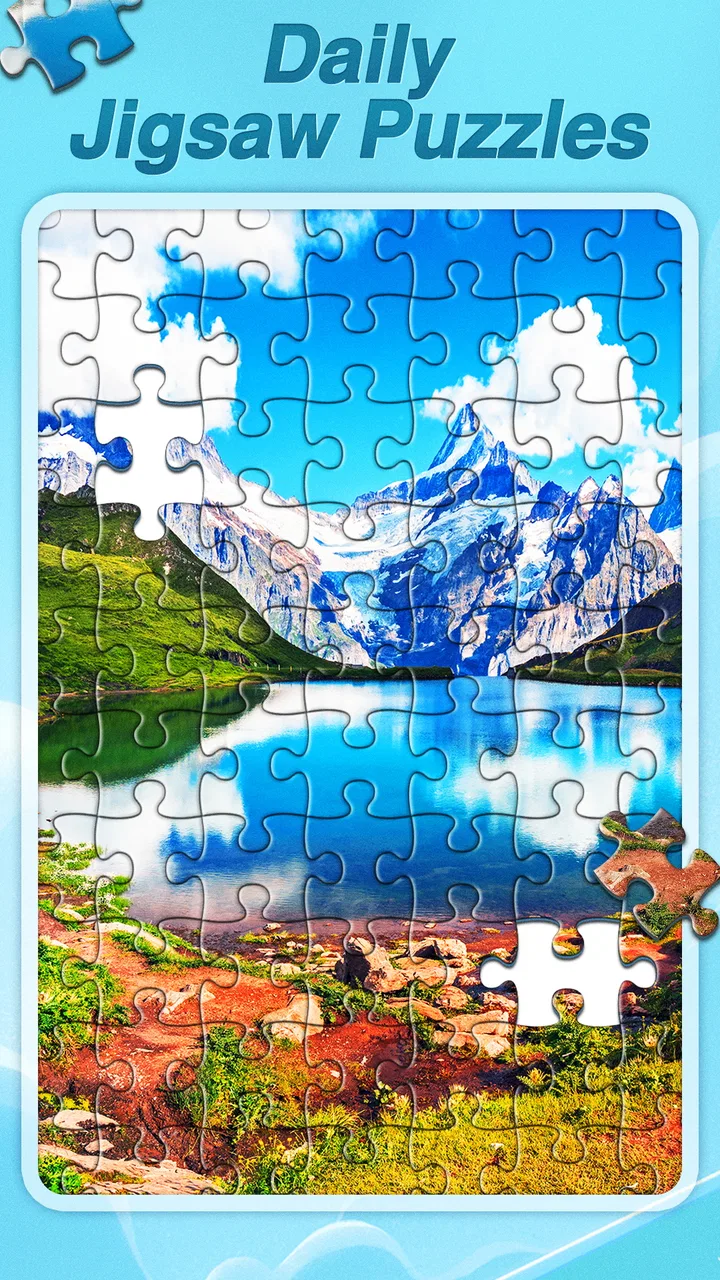
Daily Jigsaw Puzzles
- 4.7
- Rating
- 1.00M
- Installs
- Free
- Price

 Analysis by App-foxy
I opened Daily Jigsaw Puzzles expecting a simple way to fill a few quiet minutes, and that is exactly where it works best. This is a free trivia game from Big Cake Apps built around adult-friendly jigsaw solving rather than question-and-answer trivia. Its appeal is easy to understand: choose a picture, fit pieces together, and let the activity occupy your attention without demanding a fast reaction or a complicated strategy.
My experience was most positive when I treated it as a small routine instead of a game I needed to “finish.” A puzzle can sit comfortably between other tasks, making it useful after work, during a break, or before bed. The presentation is centered on attractive high-definition images, so the visual subject matters almost as much as the act of assembling it. The app is free and rated for Everyone, which makes it approachable for a broad household audience.
There is also a practical reason it has attracted attention. Daily Jigsaw has passed one million installs, with an average score of 4.9 from roughly eight thousand ratings. Those figures do not replace personal testing, but they do suggest that the basic idea is landing well with people who want calm, accessible puzzle play. The important question is whether it suits your habits, especially if you are sensitive to interruptions, need detailed progress tools, or want a more demanding brain-training experience.
You May Also Like

 Pandora - Music & Podcasts
Pandora’s Music Is Easy to Start, but Harder to Recover
Pandora’s strength is its low-effort path from a seed to a station. Its weak spot is how much confidence it asks you to place in connection, setup, and quiet recovery.

 AccuWeather: Weather Radar
AccuWeather Review: A Quick, Clear Forecast for Everyday Decisions
For everyday plans, the best forecast is the one you can understand quickly. AccuWeather makes rain timing, radar, and local conditions easy to act on, with a few trade-offs.

 Hill Climb Racing
Why Hill Climb Racing Still Turns Crashes Into One More Run
A tiny car, a bumpy hill and one more upgrade: Hill Climb Racing keeps resurfacing because its simple chaos makes every near-miss feel personal.

 AliExpress - Shopping App
AliExpress Makes Global Shopping Feel Personal, but Shoppers Bear the Risk
AliExpress turns a global marketplace into a pocket-sized discovery engine. Its reach is useful, its shopping loop compelling, and its trade-offs easy to miss.

 Lords Mobile: Kingdom Wars
Lords Mobile Is a Kingdom-Building Routine, Not a Quick Match
A case-by-case verdict on the building, battles, device demands, and social commitments that make Lords Mobile rewarding for some players and exhausting for others.

 PDF Scanner app - TapScanner
TapScanner Makes Paperwork Easier to Capture, Check, and Share
TapScanner makes scanning with a phone feel less like a rescue operation and more like a dependable step in getting work done. Its capture tools are useful, though not flawless.
More From Our News Desk
View All News


What using Daily Jigsaw feels like in practice
I find the best way to judge Daily Jigsaw is to notice what it asks of me in an ordinary day: a little visual attention, but no need to clear a long stretch of time or remember complicated goals. That makes the choice less about how many puzzles I can finish and more about whether this kind of quiet break fits my routine. From there, the key question is what that low-pressure experience is worth to you.
The first few minutes reveal the app’s real strength
The strongest part of Daily Jigsaw is its low entry barrier. I did not need to learn a ruleset, memorize controls, or understand a story before beginning. The central action is familiar: select pieces, inspect their shapes and image fragments, and bring matching edges together. That simplicity is valuable when your concentration is limited. Instead of spending the first session configuring a profile or learning a complicated interface, you can move directly into the picture.
The “daily” identity also gives the experience a useful rhythm. Rather than presenting itself as an endless technical challenge, it encourages the idea of returning regularly for a fresh visual task. I found that framing more motivating than a giant catalogue with no sense of occasion. A short session feels complete even if I am not in the mood to spend a long time solving.
At the same time, this is not the right choice for every puzzle fan. If you want competitive leaderboards, elaborate objectives, or a strong narrative layer, the quiet format may feel bare. It is better understood as a relaxing jigsaw activity with a trivia-category placement than as a broad, feature-heavy game. That distinction matters before you install it.
Where new users are most likely to hesitate
The first point of friction is usually not the puzzle itself but deciding how much time and attention to give it. A jigsaw can look easy in the opening moments, then become slower once many pieces share similar colors. I recommend starting with a short session and choosing a picture whose visual regions are clearly separated. A scene with distinct objects is easier to read than an image dominated by sky, water, foliage, or a single repeated texture.
Another common hesitation comes from handling pieces on a small phone screen. Pieces that appear obvious on a larger display can become difficult to distinguish when several are close together. I found it more comfortable to keep the device steady, work in a limited area, and avoid dragging pieces across the entire board without a reason. Small, deliberate movements reduce accidental selections and make the process feel less tiring.
It is also worth checking whether the puzzle is being approached as relaxation or as a speed test. Daily Jigsaw is much more pleasant when I stop measuring every move. If you keep restarting because the picture is not progressing quickly enough, the app can become frustrating for a reason that has little to do with its design. The better workflow is to separate pieces by visible color or edge shape, then assemble obvious sections before attempting the difficult center.
Simple setup checks before blaming the game
The application supports devices running Android 6.0 or later, so the first sensible check is your operating system. If installation fails or the game closes immediately, confirming that basic requirement is more useful than repeatedly reinstalling. I would also leave some free storage available and close unusually demanding apps before assuming the puzzle itself is broken. These are ordinary checks, but they solve many setup problems without changing anything inside the game.
Screen comfort deserves attention too. A puzzle depends on seeing small image details, so excessive brightness, glare, or a dim display can make the experience seem harder than it is. I prefer moderate brightness and a stable viewing angle. If the pieces appear muddy, adjusting the phone’s display settings may help more than searching for a difficulty option.
When a download or update seems stuck, I would first check the connection, reopen the relevant app store, and restart the device. Daily Jigsaw is currently at version 1.3.7, and keeping the installed version current is a sensible way to avoid problems caused by an outdated build. I would not clear app storage as a first response, because that can remove local information and is unnecessary for a simple connection or launch issue.
The developer is Big Cake Apps, and the game was released on January 2, 2024. Those details place it in the modern casual-game space, but they do not guarantee identical behavior on every phone. Device age, screen size, background activity, and the quality of the connection can all affect how smooth the first session feels. A careful setup is especially useful if you are installing it on an older Android device that still meets the minimum requirement.
A recovery routine when a puzzle session goes wrong
When a piece appears to be in the wrong place, I avoid immediately abandoning the puzzle. First, I move attention back to the piece’s outer shape and the strongest visual clue on it. A matching color alone is often misleading; a distinctive line, corner, or object boundary is usually more reliable. I then inspect the nearby area rather than scanning the entire board again.
If the board becomes visually confusing, the most effective recovery is to pause the current search and create a temporary order. I group pieces mentally by straight edges, strong colors, and recognizable details. Corners are the easiest anchor, followed by the outside frame. After that, I build small image clusters instead of placing isolated pieces one at a time. This approach reduces the number of possible matches and prevents the familiar “everything looks similar” feeling.
A useful but easily overlooked habit is to change your viewing distance. Holding the phone slightly farther away can make the overall image easier to read, while moving closer helps with a tiny edge detail. I alternate between those perspectives instead of forcing one distance throughout the session. It is a small technique, but it makes dense pictures less exhausting.
If the app stops responding, I would use a measured sequence: wait briefly, leave the game, reopen it, and only then consider restarting the device. Repeatedly tapping the screen can create more confusion, especially if delayed input is processed all at once. If the same problem happens repeatedly, checking the operating-system version and available storage is more productive than treating every frozen moment as a puzzle error.
I also recommend avoiding a reset unless you are certain you want to lose the current state. In any puzzle app, restarting can be more disruptive than taking a break. Put the phone down, return later, and see whether the session resumes normally. This is particularly sensible when the problem appeared after switching between several demanding apps or when the device was warm.
When the app is not actually the cause
Some frustrations come from the environment around the game. A phone with an overloaded screen, an aggressive battery-saving mode, or a weak connection may behave inconsistently even when the puzzle is functioning normally. If other apps are also slow, the broader device condition is the first place I would look. Closing unused apps and giving the phone a fresh start can distinguish a general performance problem from an issue specific to Daily Jigsaw.
Visual strain can also be mistaken for poor puzzle design. If your eyes feel tired after only a short period, the problem may be glare, font scaling, brightness, or simply the amount of concentration required by a detailed image. I would shorten the session, improve the lighting, and take regular breaks before deciding the game is unsuitable. A relaxing activity stops being relaxing when the display setup forces you to squint.
Network conditions may matter during installation, updates, or any part of the experience that needs content to load. If one puzzle does not appear correctly while other parts of the phone are behaving normally, I would first retry on a steadier connection. I would avoid making several changes at once; changing networks, clearing storage, reinstalling, and restarting together makes it difficult to know what fixed the issue.
There is another important distinction: difficulty is not evidence of malfunction. A picture with large areas of similar color can be legitimately challenging, even when every piece is behaving as expected. Before reporting a problem, I check whether the piece has a plausible shape and whether I am relying only on color. That quick test prevents many false alarms.
How it compares with familiar alternatives
Compared with physical jigsaw puzzles, Daily Jigsaw is cleaner and easier to start. There is no table to clear, no loose pieces to store, and no risk of losing a corner under furniture. It is convenient for travel or a small living space. The trade-off is tactile feedback: a phone cannot reproduce the satisfying click and texture of cardboard pieces, and the screen limits how much of the completed image you can comfortably inspect at once.
Compared with traditional trivia games, this title is slower and more visual. It does not test recall in the usual way, so it suits someone who wants a gentle concentration exercise rather than a score based on knowledge. If your main goal is learning facts, a question-based trivia app will be more useful. If you want to quiet your mind without being judged on what you know, the jigsaw format is a better match.
Compared with competitive puzzle games, the peaceful pace is both its advantage and its limitation. I appreciated not having to race another player, but people who enjoy timers, rankings, or increasingly complex mechanics may find the experience too restrained. Daily Jigsaw works best when completion itself is the reward.
It also differs from a general-purpose puzzle collection because the identity is focused. You are not jumping between word games, match-three boards, and logic challenges. That narrow purpose makes it easy to recommend to someone who specifically wants visual assembly, but less appealing to a player looking for variety in one installation.
Who should install it, and who should skip it
I would recommend Daily Jigsaw to adults who enjoy calm, picture-based activities and want something they can pick up without preparation. It is a good fit for a short evening wind-down, a quiet break from work, or a low-pressure activity while traveling. The Everyone age rating also makes it approachable for shared household use, although individual comfort with small on-screen pieces will still depend on the device.
It may be particularly useful for people who become overwhelmed by fast games. There are no reflex-heavy controls to master, and the visual task gives attention somewhere concrete to settle. I would use it in ten- or fifteen-minute intervals rather than letting one difficult image turn into a long, tiring session.
I would skip it if you need a deep progression system, a competitive community, or a reliable substitute for cognitive training with measurable exercises. I would also look elsewhere if you strongly prefer offline physical play, tactile pieces, or large-format images. The app’s simplicity is the reason it feels welcoming, but that same simplicity can feel limited after repeated sessions for players who need constant novelty.
One realistic use case is a commuter waiting for a delayed appointment. Instead of opening a social feed and losing track of time, I can complete a small section of a picture, stop naturally, and return to the surroundings without having to remember a complicated mission. Another is the end of a workday: the puzzle provides enough focus to interrupt repetitive thoughts, while its familiar rules avoid the mental demand of learning something new.
My practical verdict after using it
Daily Jigsaw Puzzles succeeds because it understands the value of a narrow, peaceful activity. The attractive imagery gives the simple mechanics a reason to return, while the daily framing adds structure without turning the game into a chore. I especially like that the experience can be shaped around a short break rather than requiring a long commitment.
My main caution is to keep expectations realistic. This is not a feature-packed trivia platform, a competitive challenge, or a replacement for a physical puzzle collection. Some images will be harder to read on a small display, and device or connection issues can look like game problems if basic setup checks are skipped. The best results come from a comfortable screen, patient piece sorting, and a willingness to pause when concentration drops.
For a free game released by Big Cake Apps, its current version is 1.3.7, and its broad audience positioning makes it easy to try on a compatible phone. I would install it for relaxed visual play, especially if I wanted a dependable daily ritual rather than a demanding test. My recommendation is simple: choose Daily Jigsaw when calm focus matters more than competition, and choose another puzzle style when depth, speed, or tactile play is your priority.
FAQs for Daily Jigsaw Puzzles
01What is Daily Jigsaw Puzzles and how does it work?
Daily Jigsaw Puzzles is an app that provides users with a new jigsaw puzzle every day. Each puzzle features beautiful images and various difficulty levels, allowing both beginners and experts to enjoy. Users can choose the number of pieces, and the app offers a smooth drag-and-drop interface to assemble the puzzle.
02Is Daily Jigsaw Puzzles available for both Android and iOS?
Yes, Daily Jigsaw Puzzles is available for download on both Android and iOS platforms. You can find the app on the Google Play Store for Android devices and the Apple App Store for iOS devices. Simply search for "Daily Jigsaw Puzzles" and install it on your device to start playing.
03Are there any in-app purchases or subscriptions required?
Daily Jigsaw Puzzles is free to download and offers a selection of puzzles without any cost. However, there are optional in-app purchases available, such as additional puzzle packs or an ad-free experience. Subscriptions may also be offered to unlock premium features or exclusive content.
04Can I play Daily Jigsaw Puzzles offline?
Yes, Daily Jigsaw Puzzles can be played offline once the puzzles are downloaded. This feature allows you to enjoy puzzling without the need for an internet connection, making it perfect for travel or areas with limited connectivity. Ensure you download your favorite puzzles while online to access them later.
05How can I share my completed puzzles with friends?
Sharing your completed puzzles is easy with Daily Jigsaw Puzzles. After finishing a puzzle, you can use the app's built-in sharing feature to post your completed image on social media platforms or send it directly to friends via messaging apps. This feature allows you to showcase your achievements and challenge friends to complete the same puzzle.
Pros
- Engaging daily challenges to keep you entertained.
- Variety of puzzle difficulties for all skill levels.
- Beautiful
- high-quality images enhance the experience.
- User-friendly interface for seamless navigation.
- Offline play available for puzzle fun anytime.
Cons
- Ads can be intrusive during gameplay.
- Limited free puzzles without in-app purchases.
- Occasional performance lags on older devices.
- No multiplayer mode for shared puzzle fun.
- Custom image puzzles not supported.

Daily Jigsaw Puzzles
Gallery